Kinds of your own
A model is not only components. A plant has tanks, pumps and valves; a company
has teams and assets. Declare a kind, and its name becomes a word of your
model: pump P1 { flow 12m³/h }. Nothing is compiled again: the kind is model.
A kind#
A kind says what its elements hold.
/// A machine that moves liquid from one place to another.
kind pump "Pump" {
  prop flow: float64 unit m³/h
  prop head: float64 = 30m
  prop note: optional string
  relation feeds -> pump | tank
  children valve
  check flow > 0 "a pump must move something"
  draw circle
  icon "P"
}
kind tank "Tank" {
  prop volume: float64 unit m³
  draw cylinder
}
kind valve "Valve"

tank T1 "Raw water" { volume 5m³ }
pump P1 "Feed pump" {
  flow 12m³/h
  feeds T1
  valve FV-101
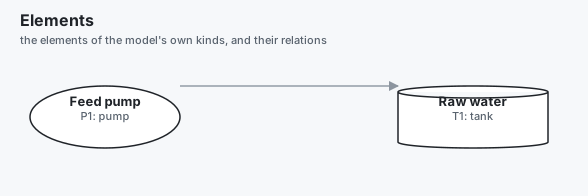
}
| In a kind | What it says |
|---|---|
prop name: type |
A property every element gives. unit m³/h is the unit its values are written in. |
prop name: type = value |
A property with a default: an element may leave it out. |
prop name: optional type |
A property an element may leave out, with no default. |
relation name -> kind | kind [n..m] |
A link from an element of this kind to others. See Relations. |
children kind, … |
The kinds written inside an element of this kind. |
check condition "message" |
A condition every element must meet. See Checks. |
draw shape |
How its elements are drawn: box, rounded, circle, ellipse, diamond, hexagon or cylinder. |
icon, color, description |
As for any kind of the catalog. |
verifies REQ-1 |
The requirements its checks are evidence for. |
A type is bool, string, a number type, an enum or a type of the model.
A type Flow = float64 unit m³/h brings its unit with it.
An element is written with the kind's name, its own name, an optional label, then its properties and relations by name. Its name is one of the whole model, as a requirement's is. A child is written inside its parent, with or without a block of its own.
What is checked#
archec check reports each of these as an error.
- A word that is neither a keyword nor a kind in scope:
unknown-kind, with a did-you-mean. - A property the kind does not have:
kind-prop-unknown. - A property every element must give, and this one does not:
kind-prop-missing. - A value of the wrong type, or in the wrong unit:
kind-prop-value,kind-prop-unit. Nothing is converted:flow 200L/minis an error where the kind saysunit m³/h. - A child of a kind the parent's kind does not list:
kind-child. - A kind with elements of its own named as a keyword of the language:
kind-shadows-keyword.
Scope: a library of kinds#
A kind is in scope once its file is part of the project. Put the kinds in a
file of their own, and include it. A library that holds kinds is used the
same way as any other library.
include "plant-kinds.arche"

tank T2 { volume 12m³ }
A kind and its package#
A library of kinds puts them in a package, so that two libraries may each
have a valve:
package plant

kind valve "Valve" {
  prop size: float64 unit mm
}
kind tank "Tank" {
  children valve
}
While valve is the only kind of that name in the model, a project writes
valve V1 { size 50mm }. When another package has a valve too, the project
says which one, with the package first:
plant.valve V1 { size 50mm }
net.valve V2 { rate 5Mbps }- The qualified name always reads, clash or not:
plant.tank T1. - A word is read from where it is written. Inside package
plant,valveisplant.valve(extends valve,children valve,-> valve). Inside an element, a word is read from the package of that element's kind: in aplant.tank,valve V1is aplant.valve. - A project's own kind, declared in no package, wins in the project's files.
- A word two packages have a kind for, written anywhere else, is the error
kind-ambiguous. It names what to write.
A kind two packages have keeps its package in its name everywhere:
archec query main.arche plant.valve, archec import table … --as net.valve,
and elements.yaml. Relations need no package: a relation is found by the
kind it goes from.
A pack is such a library for a whole domain, taken in one step:
archec shelf add main.arche process-plant. To turn a table (an equipment
list, an asset register) into elements of a kind, see
archec import table.
A kind built on another#
kind pump "Pump" {
  prop flow: float64 unit m³/h
  check flow > 0 "a pump must move something"
}
kind booster "Booster pump" extends pump {
  prop stages: int32 = 2
  check stages >= 2 "a booster has two stages or more"
}

booster B1 { flow 8m³/h; stages 3 }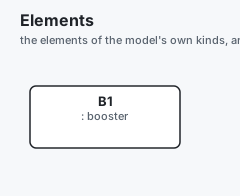
A booster has the properties, children, relations and checks of a pump, and its
own. It goes wherever a pump goes: a relation to pump takes it, and
archec query main.arche pump lists it.
Relations#
A relation is a named link, typed by the kinds at its ends.
kind team "Team"
kind tank "Tank"
kind pump "Pump"

relation owns:     team [1] -> pump | tank [1..*]
relation monitors: component -> tank | pump

tank T1
pump P1
team Ops { owns P1, T1 }

component LevelControl { monitors T1 }
The element a relation goes from names the ones it goes to. An end is a kind
of your own, or an element of the language: component, system,
requirement, actor and the others.
The count after the target is how many elements each source links to. The
count after the source is how many sources link to each target. Above, every
pump and every tank has exactly one team, and a team owns at least one of them.
A target of another kind is the error relation-kind.
A count not met is the warning relation-cardinality. It is evidence, as a
check is: archec status lists each count on each element, as the condition it
is (count(owns) >= 1, count(incoming(owns)) == 1). Say which requirement it
proves in a block after the relation:
requirement REQ-OWNED "Every asset has one team"
kind team "Team"
kind asset "Asset"

relation owns: team [1] -> asset {
  verifies REQ-OWNED
}
Without verifies, a count is evidence for the requirements of the kind the
relation is written in, else of the kind of the element counted.
Other counts for other kinds#
A count holds for every kind of its end. To count differently by kind, declare the relation again with the same name, for the other kinds:
kind controller "Controller"
kind valve "Valve"
kind pump "Pump"

relation controls: controller [1] -> valve
relation controls: controller -> pump
Every valve has exactly one controller, and a pump needs none. An element
still writes controls V1, P1: each link belongs to the declaration whose
kinds take its target. Two declarations with the same name may not share both
a source kind and a target kind (duplicate).
A relation written inside a kind goes from that kind, and names no source:
relation feeds -> pump | tank.
Checks#
A check is a condition, written as it reads to the end of the line, then the
message a breach gives.
kind team "Team" {
  prop size: int32 = 1
  check size >= 1 and size <= 12 "a team has 1 to 12 people"
  check count(owns) >= 1 "a team owns something"
}
kind asset "Asset"
relation owns: team -> asset| In a condition | Meaning |
|---|---|
flow, head |
A property of the element. One it does not give has no value: the check says nothing. |
120m, "open", true |
A number with its unit, a text, a truth value. |
== != < <= > >=, in [a, b] |
Comparisons. |
and, or, not, + - * / % |
Logic and arithmetic. Write a subtraction with spaces: a - b. |
feeds, owns |
The elements a relation links it to. count(feeds) is how many. |
children, valve |
The elements written inside it; those of one kind. |
parent, self, name, label, kind |
The element it is in, itself, its name, label and kind. |
incoming(feeds) |
The elements that link to it by a relation: what feeds it. incoming(feeds, parent): to another element. |
parent.volume, feeds.volume |
A property of another element, or of each of a list. |
count, len, sum, min, max, abs, exists, matches |
The functions: matches(name, "^P[0-9]+$"). |
exists v in feeds: v.volume > 1m³, forall v in children: … |
At least one of a list fits; every one fits. |
has(self, label), tagged(parent, key), vars(parent) |
The model's functions, as in a requirement's check (checks). |
Two quantities compare only in the same unit, as nothing is converted. A bare number is read in the unit of what it is compared with.
A check that fails is a warning at the element (check-failed), as a
requirement's check that fails: the model still builds, and
archec check --strict fails on it. archec status
counts every check on every element and shows a failing one.
The requirement a check proves#
With verifies REQ-1 on the kind, each of its checks is evidence under that
requirement, evaluated on the model as it is. A check that proves another
requirement says so after its message:
requirement REQ-SOUND "Pumps are sound"
requirement REQ-TAGS "Pumps are tagged"

kind pump "Pump" {
  prop flow: float64 unit m³/h
  check flow > 0 "a pump must move something"
  check matches(name, "^P-[0-9]+$") "a pump's tag is P- and a number" verifies REQ-TAGS
  verifies REQ-SOUND
}- A check with its own
verifiesis evidence for those requirements only. - A kind that says no
verifiestakes that of the kind it extends. - A check written in a kind keeps that kind's requirement on the elements of the kinds built on it.
- A requirement that a kind, a check or a relation
verifiesis satisfied by the elements of the kind: it is not reported asrequirement-unsatisfied.
Asking the model#
archec query asks the model as a graph.
| Question | Answer |
|---|---|
archec query main.arche pump |
Every pump, and every kind built on it. |
archec query main.arche "pump feeds T2" |
The pumps that feed T2. |
archec query main.arche "P1 feeds ?" |
What P1 feeds: ? is the side asked for. |
archec query main.arche "pump feeds+ T2" |
The pumps that feed T2 through any number of links. |
archec query main.arche "* owns P1" |
Whatever owns P1. |
archec query main.arche "valve in ?" |
The elements a valve is written inside. |
archec query main.arche "pump where flow > 10m³/h" |
The pumps a condition holds for. |
The traces of the language are relations too: component satisfies ? lists
the requirements a component satisfies. --json gives the answer as data. The
command exits with 1 when nothing answers.
Where the elements appear#
archec diagram main.arche elementsdraws the elements and their relations as Mermaid, D2 or SVG, each in the shape its kind says. An element that holds others opens on them:elements:P1.- The Model tree of the editor lists them under Elements, by kind.
archec export main.arche --jsongives each element withkind: "instance", itselementKindand its properties. Each link is a trace of the relation's name.archec buildwriteselements.yaml: the kinds, the relations, the elements and their links.kinds.yamlkeeps each kind's label, icon and colour.
The example is examples/kinds.
Limits#
- An element of a kind of your own is written at the top level, or inside
another one. It is not written inside a
systemor acomponentyet. - An element takes its kind's properties and relations, and
description,tagsandcolor. It does not take the language's traces (satisfies,verifies): sayverifieson its kind. - The Arche app has no page for these elements. It reads
kinds.yamlas before, andelements.yamlis there for other tools. - A check reads one element and what it is linked to. It does not run the simulator, and it does not prove a property of a state machine.
- Nothing is converted between units. Write a value in the unit of its property.
- The editor draws every element as a box. The shapes are drawn by
archec diagram. - A kind has no behaviour: no ports, functions or states. A part that behaves
is a
component, which may saykind pumpas before. - A property has one type and one unit. There is no interval type yet
(
0..10bar), and no property whose unit each element chooses. - A link has no properties of its own. What a link carries is an element
between the two (a
linebetween a tank and a pump). - A
unitis declared with a plain name and its spelling as an alias:unit kgh "kilogram per hour" { quantity mass-flow; alias "kg/h" }. - A component's
kindthat names a kind two packages have is written with the package:kind plant.valve.
Not yet: kinds that behave#
A kind's elements are not simulated. This is the plan, not built yet.
A kind would name the component its elements are made of, and say which properties are that component's parameters and which relation links which ports:
kind tank "Tank" {
  prop volume: float64 unit m³
  behaves as TankModel(volume)        // a component with equations (std/physics)
  relation feeds -> pump | tank via out -> in
}
behaves as Def(prop, …): each element is a part ofDef, with its properties given as the definition's parameters. The units must agree.via out -> inon a relation: each link becomes a link from the source part's portoutto the target part's portin. With thefluidport type ofstd/physics, the potentials are equal and the flows add up.archec buildwould then write one system, made of the elements' parts and links, thatarchec physicsandarchec simrun. A test plan would read the parts by the elements' names:expect T-102.level > 1m.
What it needs first: element names as part names (a hyphen is allowed in both), a place for the generated system in the project, and a rule for an element whose kind does not behave (left out, with its links).